aglasem
  • Home
  • Entrance Exams
  • Competitive Exams
  • School Boards
  • University & Colleges
No Result
View All Result
aglasem
  • Home
  • Entrance Exams
  • Competitive Exams
  • School Boards
  • University & Colleges
No Result
View All Result
aglasem
No Result
View All Result

CBSE Class 10th Result 2018 Announced; Know How to Check It Here!

by Arunima Sharma
May 29, 2018
in School Boards
Reading Time: 2 mins read

Central Board of Secondary Education (CBSE) has declared CBSE Class 10th Result 2018. More than 16 lakh candidates can now check how they performed in the examination. The Board announced the result online, on cbseresults.nic.in. Students can also check class 10th result from cbse.nic.in and results.nic.in.

To check the result, the candidates just need to visit the official website. Then, the candidates will have to click on “CBSE – Class X Examination – Announced on 29th May 2018” link. It will lead to a new portal, where the candidates will have to enter roll number, date of birth, school number, and center number. Next, the candidates need to click on the ‘Submit’ button. Then, check and download the result.
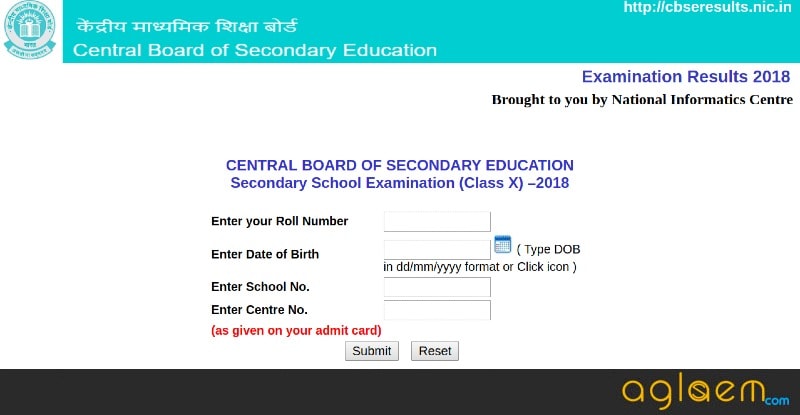
This year, CBSE has provided various ways to check the result of Class 10th. The candidates can also check it from Microsoft SMS app, UMANG app, DigiLocker, IVRS, SMS, and on Google. Through IVRS, SMS, and Microsoft app, the result can be checked offline. The candidates just need to download SMS Organizer for Android, register on it by entering roll number, school code, and date of birth. The result will be notified to the candidates via SMS.

On the other hand, to check the result through IVRS, the candidates need to call at 24300699, if from Delhi region, or at 011-2430699, if from any other region. To check the result of CBSE class 10th through SMS, the candidates will have to sent an SMS on 7738299899. The message is to be framed as – cbse12 <roll number> <school number> <center number>.

Through DigiLocker, the candidates will be able to download their digitally signed marks sheet and documents. To do, the candidates will have to create an account by submitting basic details like name, date of birth, gender, aadhaar number, etc. Then the candidates will get a username and password, with the help of which the candidates will be able to download the mark sheet.

The UMANG app is available in play store. The candidates just need to install it and check the result. This year, Google has collaborated with CBSE and is releasing the result portal on the front page. The candidates just need to type CBSE Class 10th Result 2018 on google and a portal will be displayed. Through it, the candidates can check the result.

All the best to all the candidates who will be checking their CBSE Class 10th result 2018. We hope you qualify the exam with flying colours.

Tags: 10th ResultCBSEClass 10
Previous Post

MGKVP Result 2018 For B.Ed, BBA, BSc, BCA Announced

Next Post

CBSE Class 10th Result has been announced: Here are some important highlights of the Class 10th result

Related Posts

School Boards

Bihar Board Matric Exam 2025: Answer Key Released and Objection Registration Begins

March 8, 2025
School Boards

Aarav from Manthan School Excels in Aryabhata Ganit Challenge 2024

December 27, 2024
School Boards

Abhyuday, IIT Bombay: College & Student Representative Programs 2024

August 17, 2024
School Boards

Understanding APAAR ID, One Nation One Student ID for School Students

October 16, 2023
COMEDK 2022 College Predictor
School Boards

MP Board Trimasik Pariksha Question Papers

September 20, 2023
School Boards

Teacher’s Strike Disrupts 50,000 Odisha Schools: Government Faces Backlash

September 15, 2023
Next Post

CBSE Class 10th Result has been announced: Here are some important highlights of the Class 10th result

New

SRM University-AP awarded QS I-GAUGE Diamond rating for overall institutional excellence

October 12, 2025

KIIT ranks in 501–600 band globally, 5th in India in THE World University Rankings 2026

October 12, 2025

World University Games 2025: KIIT Athletes Honored for Medal Wins

August 4, 2025

Bharati College Launches AI-Powered Digital Marketing Course in Collaboration with RKFMA

August 3, 2025

Amrita Vishwa Vidyapeetham Announces New Campus in Haridwar with Scholarship Opportunities for B.Tech Aspirants

July 31, 2025

Entrance Exams

  • Agricultural Entrance Exams
  • Architecture Entrance Exam
  • Arts and Humanities Entrance Exams
  • Commerce Entrance Examinations
  • Common Entrance Examinations
  • Computer Application Entrance Exams
  • Design Entrance Exams
  • Education Entrance Exams
  • Engineering Entrance Exams
  • Hotel Management Entrance Exams
  • Law Entrance Exams
  • MBA Entrance Exams
  • Media & Journalism Entrance Exams
  • Medical Entrance Exams
  • Nursing Entrance Exams
  • Pharmacy Entrance Exams
  • Science Entrance Exams
  • Diploma & Polytechnic
  • Lateral Entry

Helpful Resources

  • Class Notes
  • NCERT Solutions
  • NCERT Books
  • HC Verma Solutions
  • Courses After Class 12th
  • Previous Year Question Papers
  • More Study Material

Free Mock Tests

  • Agricultural Exams
  • Architecture Exams
  • Education Exams
  • Engineering Exams
  • Law Exams
  • MBA Exams
  • Medical Exams
  • Pharmacy Exams
  • Science Exams
  • More Mock Tests

Entrance Exams

  • Agricultural Entrance Exams
  • Architecture Entrance Exam
  • Arts and Humanities Entrance Exams
  • Commerce Entrance Exams
  • Common Entrance Exams
  • Computer Application Entrance Exams
  • Design Entrance Exams
  • Education Entrance Exams
  • Engineering Entrance Exams
  • Disclaimer
  • Terms of Use
  • Privacy Policy
  • Contact

© 2020 aglasem.com

  • Home
  • Entrance Exams
  • Competitive Exams
  • School Boards
  • University & Colleges

Discover more from AglaSem News

Subscribe now to keep reading and get access to the full archive.

Continue reading